BUILDING WITH AI / UX WORKFLOW
UX NAVIGATOR / UX PARTNER
Product designer & builder / Local product and separate demo
A design partner that can show its sources.
I designed and built an AI-assisted workspace that helps designers resume projects, reason from evidence and review changes before accepting them. The product treats a generated suggestion differently from an approved decision.
AT A GLANCE
8 scenarios
Fictional evaluation scenarios
87 / 87
Technical checks passed in the documented run
Human review
Designer decides which change to accept
The V1.2.5 checks verify defined behavior, not answer accuracy, usage or time saved. A separate demo uses fictional data without live AI.
01 / CONTEXT & ROLE
A convincing answer can still lose the project.
Designers do not restart their work from a blank prompt every day. They inherit notes, screenshots, decisions and disagreements. If a chat tool only responds to the last message, the user has to reconstruct that context or risk a confident answer based on the wrong version of the problem.
I designed the interaction model, interface and evidence rules, and used AI-assisted development to build the application. My goal was not to automate a designer’s judgment. It was to make project material, the system’s interpretation and the designer’s decision separately visible so that a useful draft did not silently become a commitment.
The product has a local working version and a separate public demonstration with fictional examples. The demo shows how to enter and navigate the workspace without connecting live AI or exposing real project material.
FIG. 01
First entry in the public demo
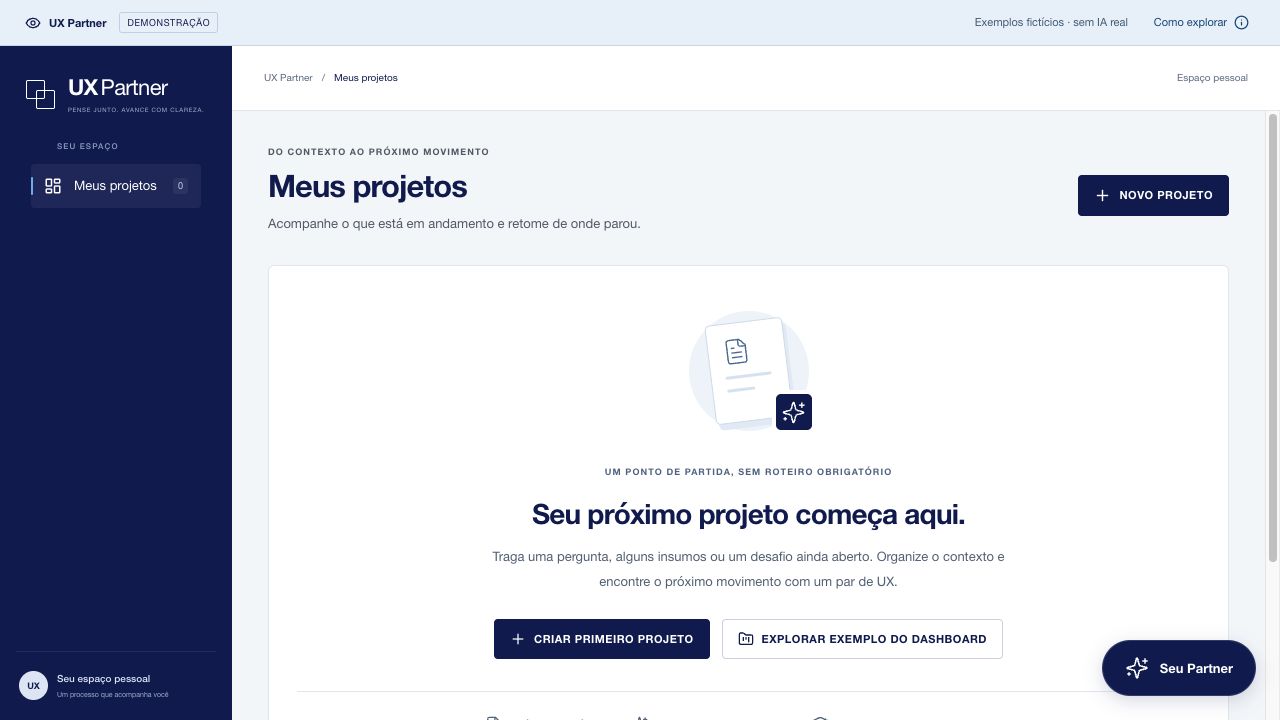
Fictional demo. The entry offers a new project or a sample dashboard, without requiring users to start a live AI session.
02 / PROJECT CONTINUITY
Start from the project and its open decisions.
I built the workspace around versioned inputs: notes, files, prior decisions and selected conversations. The overview lets the designer see what is in the project and where to resume. That is a different starting point from asking a question and hoping the assistant has retained the right facts.
When preparing a response, the system needs to know which text was recorded, which was proposed, and where it came from. An early implementation sent the body of older deliverables to the model but omitted some of their nature and source metadata. A previous suggestion could then look like a requirement simply because it was in a document.
I corrected the context assembly to carry those distinctions, along with version and source information. Older material without a clear status remains something to review. This is less tidy than flattening everything into one brief, but it protects the designer from accidentally inheriting a decision no one made.
FIG. 02
Project overview, sources and deliverables
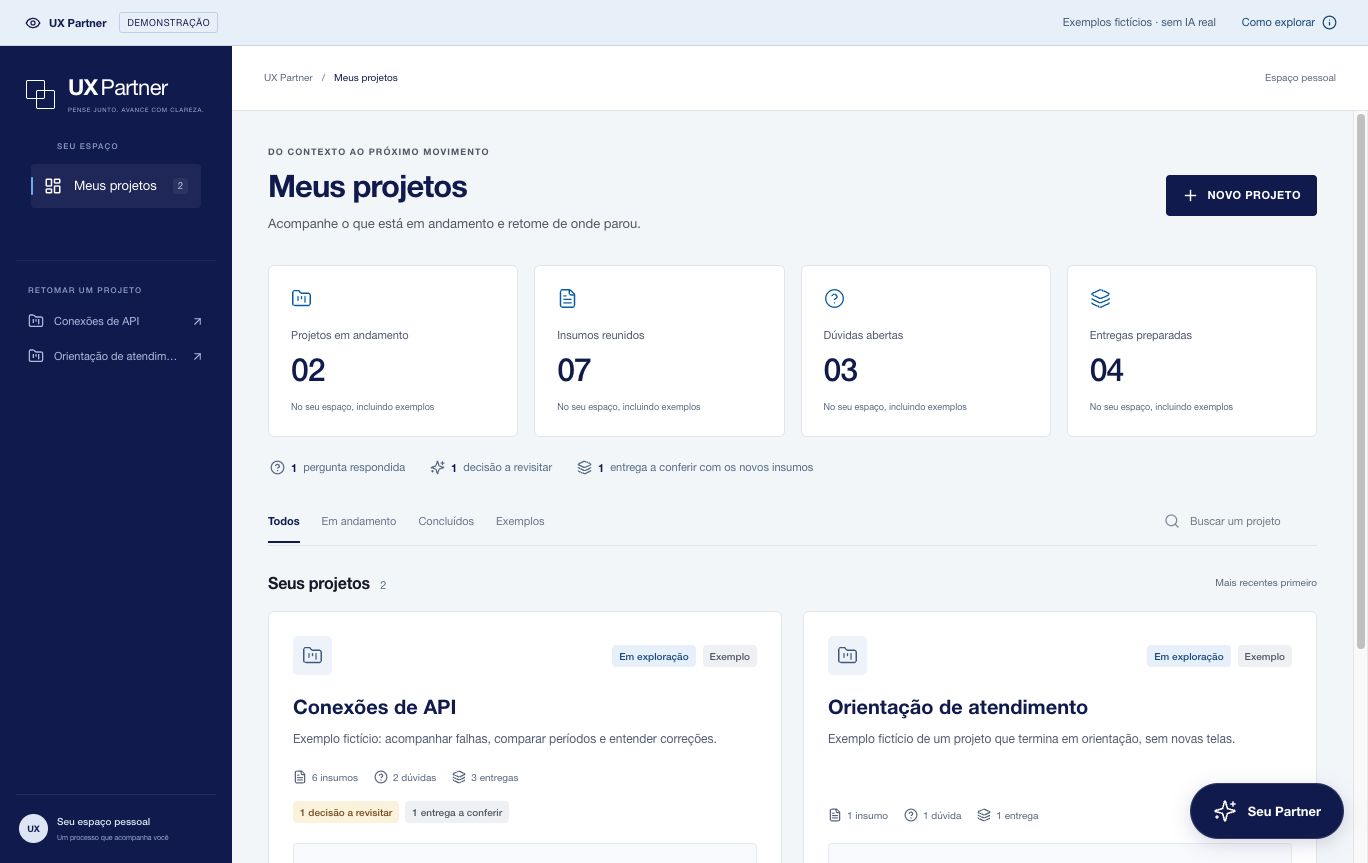
Original demo capture with fictional projects. The workspace provides continuity outside the chat.
03 / A CONCRETE FAILURE
Do not give the technician a job the brief never defined.
I used a fictional API dashboard brief to see what the system did with incomplete information. The notes supported counting recorded failures, showing reasons and comparing periods. They did not establish a denominator for a failure rate, who owned ticket resolution or whether the technician needed an action to close a ticket.
Earlier drafts filled those gaps with details that sounded reasonable: ownership, notification rules or buttons. The response could look specific and useful while changing the assignment. I changed the product so the designer can ask for a provisional structure without needing to accept its open assumptions.
The revised draft labels the proposal, links the evidence and keeps dependencies next to the recommendation. It can propose counts now and condition a rate on confirming total attempts. The interface makes progress possible without presenting an unsupported requirement as settled.
FIG. 03
A draft for discussion, not an accepted brief
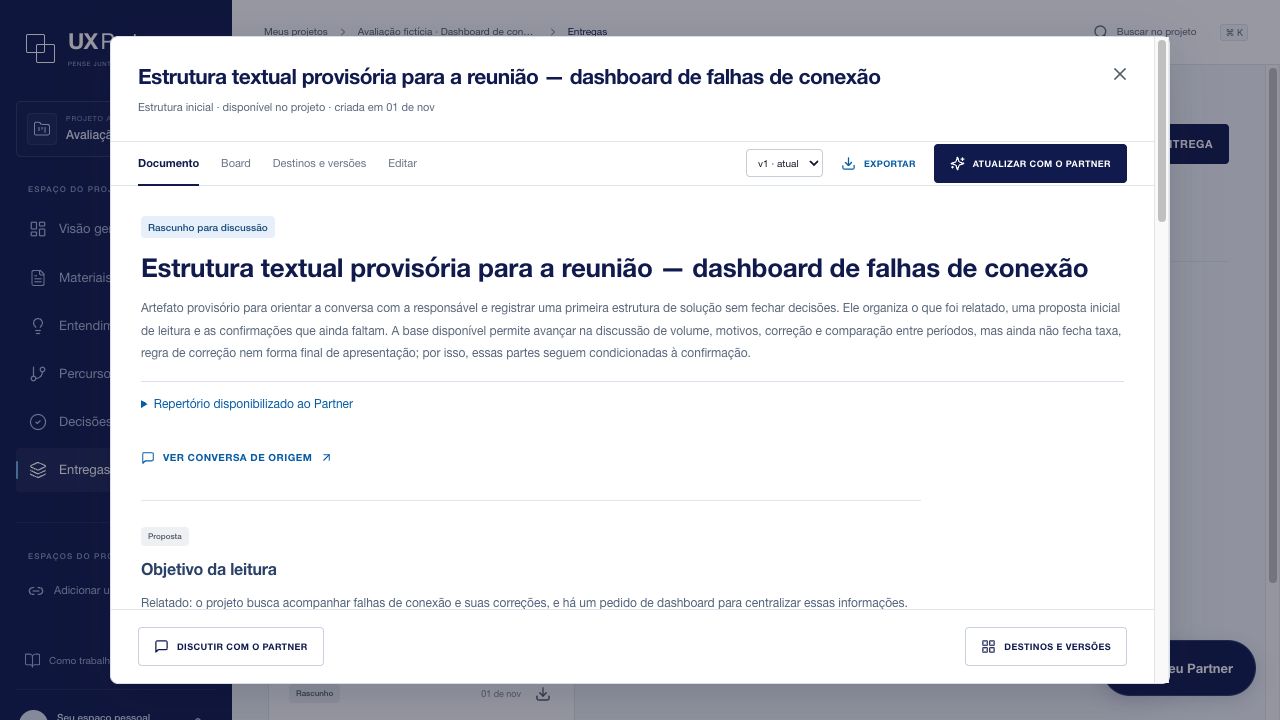
Fictional scenario. The introduction states what can be discussed now and what still needs confirmation.
FIG. 04
Sources and open conditions inside the deliverable
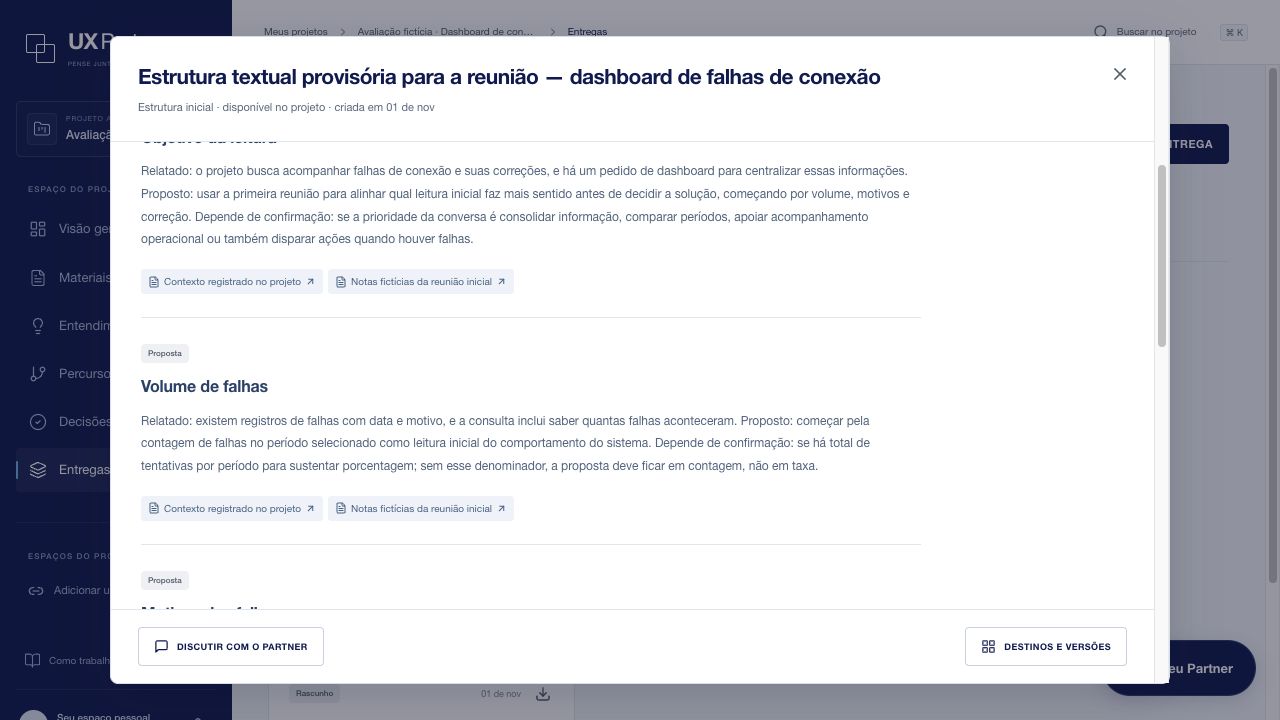
The draft links the original material and explains that a rate depends on having total attempts.
04 / VISUAL REVIEW & VERSIONING
Make the reasoning inspectable before saving a decision.
In visual review, a finding sits with the source capture and the observed state. A proposed change is not the same thing as an observed barrier. The designer can inspect the evidence and edit or reject the finding instead of relying on a summary generated from a screen.
When the assistant proposes a revision, the workspace preserves the original and exposes a comparison. That lets the designer verify whether the intended part changed and whether prior decisions were preserved. Revision is an option, not permission to overwrite.
I added a second pass using the same model and evidence to review whether a draft is supported before it is saved. This can catch some errors, but it adds latency and token cost and is not independent verification. If that pass fails, the application does not present the unchecked draft as a completed result.
01 / SOURCE
What the project actually records
02 / PROPOSAL
What the assistant suggests or still needs
03 / DECISION
What the designer accepts or leaves open
FIG. 05
A visual finding tied to its source
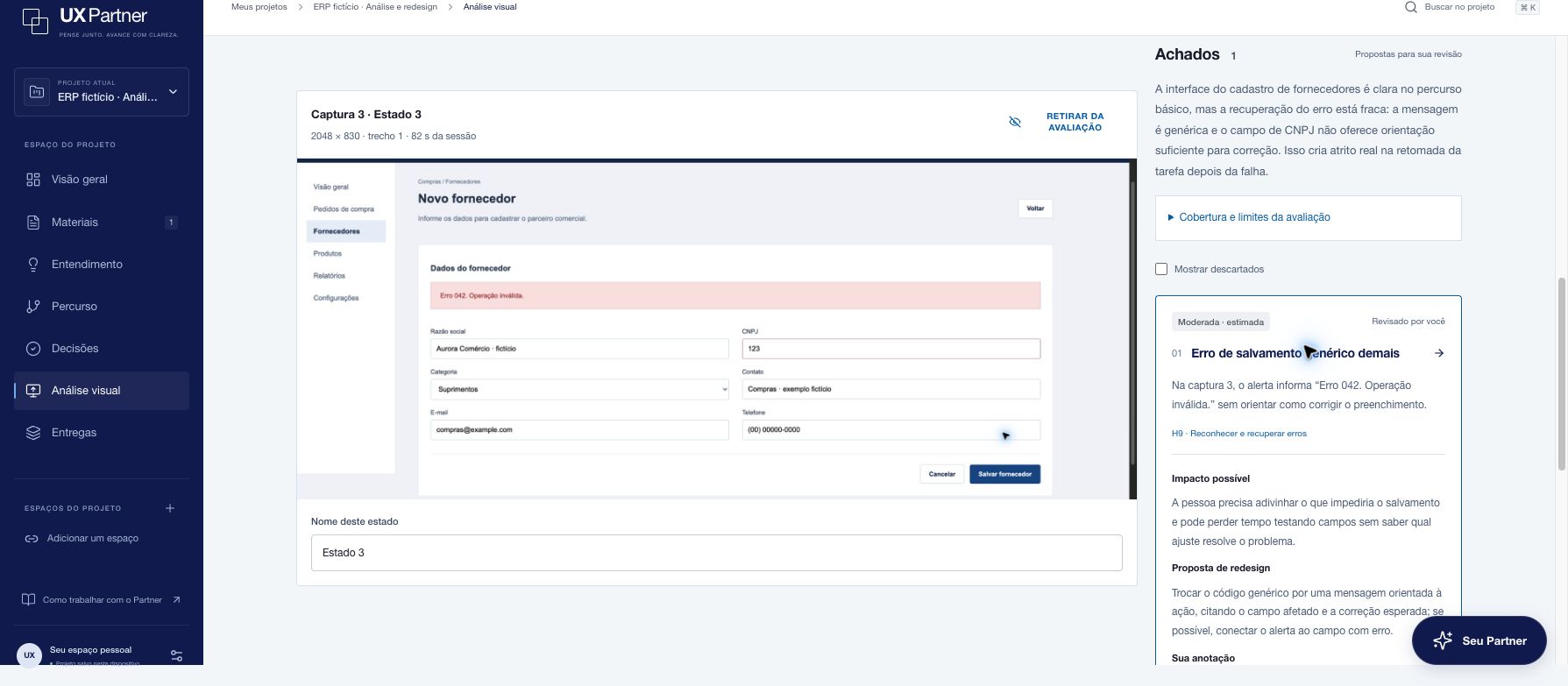
Original evaluation screen from a fictional ERP scenario. The capture, observation and editable finding can be inspected together.
FIG. 06
Compare the proposed version with the saved one
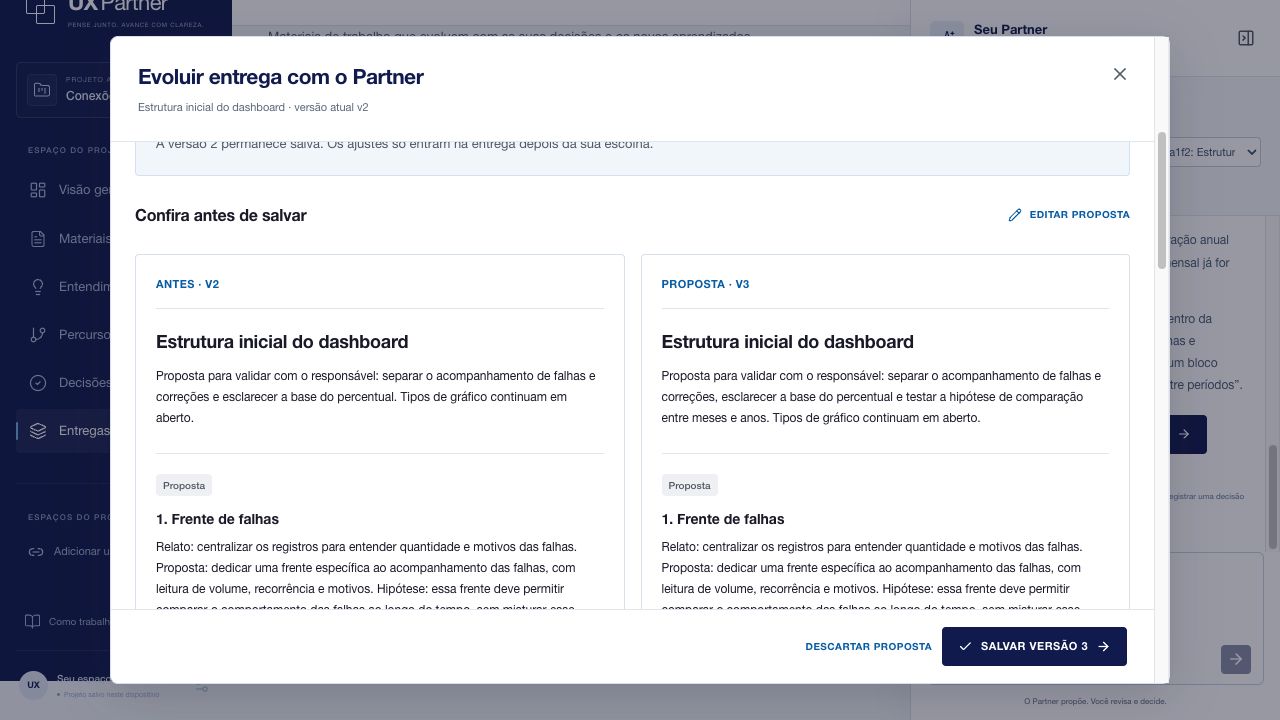
The comparison leaves the decision with the designer and keeps the original deliverable available.
05 / EVALUATION & REFLECTION
Passing checks is not the same as being right.
I used fictional scenarios to turn observed failure modes into repeatable checks. In the documented V1.2.5 run, 87 out of 87 technical checks passed across eight scenarios. The checks verify behaviors such as preserving existing versions and retaining the origin of a proposed update. A separate automated application suite passed 204 tests.
I reviewed the responses separately for useful advice. Earlier runs also passed their technical checks while still adding details the brief did not support. That gap is why I report the contract results and avoid treating them as accuracy, user impact or proof that the tool has replaced specialist review.
The next evaluation would follow designers resuming real work: how much context they need to restate, how often they correct findings, and whether a reviewed deliverable saves time. My main lesson was that the product is more useful when it can say what is missing and still suggest a bounded next action.